


Theo Yu 于学龙

Full-stack with AI agents · ten years in the field

Theo Yu 于学龙

Ten years of building software, now working full-stack with AI agents.
Orbiting around me: apps of my own, and a few projects made with teams.

All projects

4 independent apps · 2 selected team projects · select to open

  1. 01 TSX Independent · macOS Released · MIT open source
  2. 02 Lumax Clip Independent · macOS On the Mac App Store
  3. 03 Lumax Tempo Independent · macOS On the Mac App Store
  4. 04 Pennilo Independent · iOS On the App Store
  5. 05 Xuanwu AI Network Control Platform Team projects · Tianchi 2025 — Present
  6. 06 Fatianshi Contract Library Team projects · Fatianshi H2 2020 — Early 2025

Project details

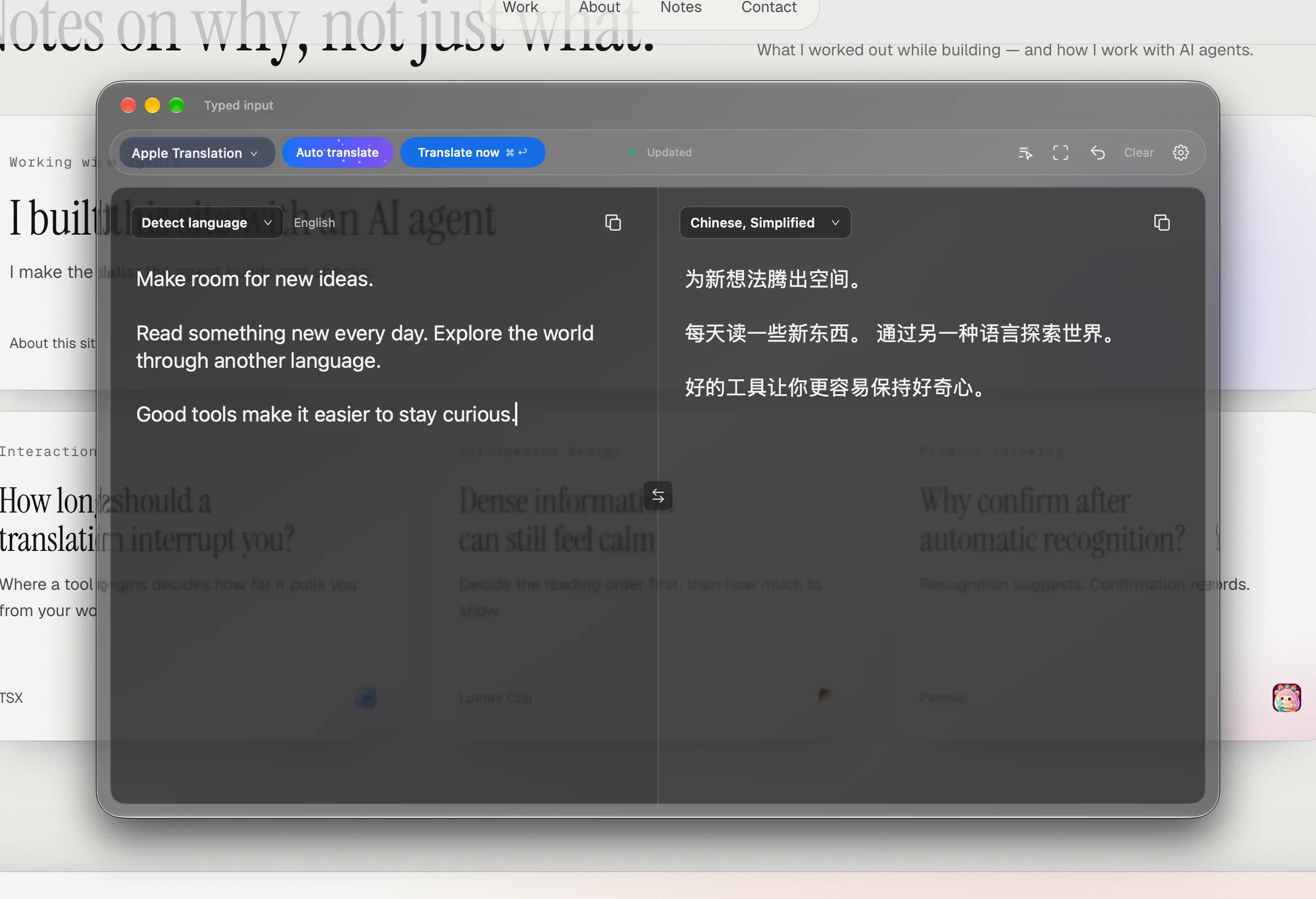
TSX · Dark Liquid Glass
Actual UI · demo text

Independent

TSX

Native macOS translator

macOS · Released · MIT open source

A native macOS translator: select text or capture part of the screen, get the result in a floating panel, and edit in both directions — with Apple Translation or services you configure yourself.

What’s confirmed

  • Native macOS app, released on GitHub and open source under MIT.
  • Entry points: text selection and screen capture; results in a floating panel with two-way editing.
  • Translation: Apple Translation, or other services you choose to configure.

Worth talking about

  • Selection & capture
  • Staying in the flow
  • Two-way editing
  • System vs. external services

Real captures of TSX 1.3.4 with demo text; the page behind the dark glass window is this site’s English version.
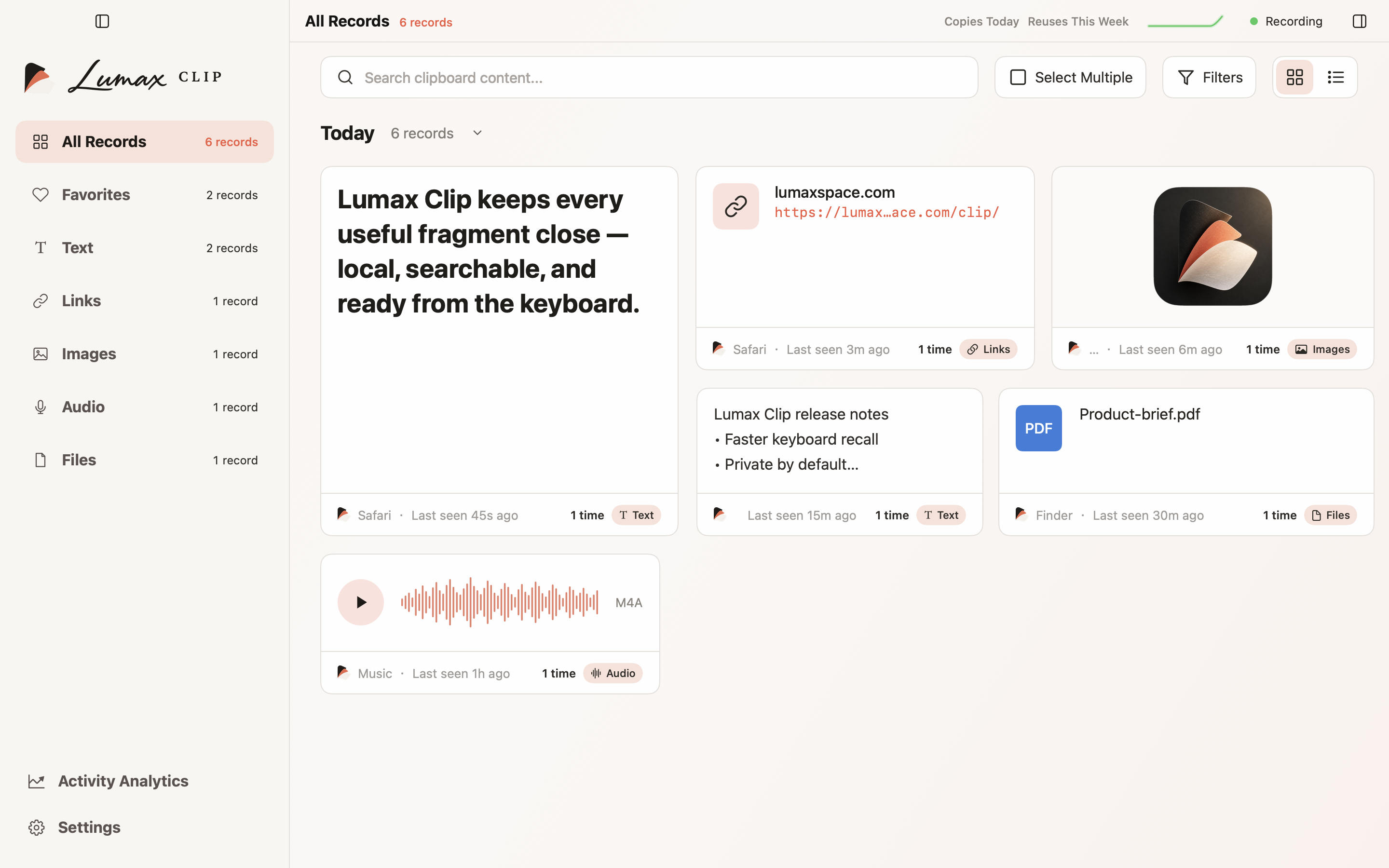
Lumax Clip · Main window
Actual UI · demo data

Independent

Lumax Clip

Clipboard manager

macOS · On the Mac App Store

A clipboard manager for text, links, images, audio and file references — with search, categories, favorites and a keyboard-first workflow.

What’s confirmed

  • A macOS app, available on the Mac App Store.
  • Handles text, links, images, audio and file references.
  • Search, categories, favorites, and a keyboard path from summon to paste.

Worth talking about

  • Search
  • Information hierarchy
  • Keyboard workflow
  • Localization
  • Local-first data

Actual app UI with isolated demo data.

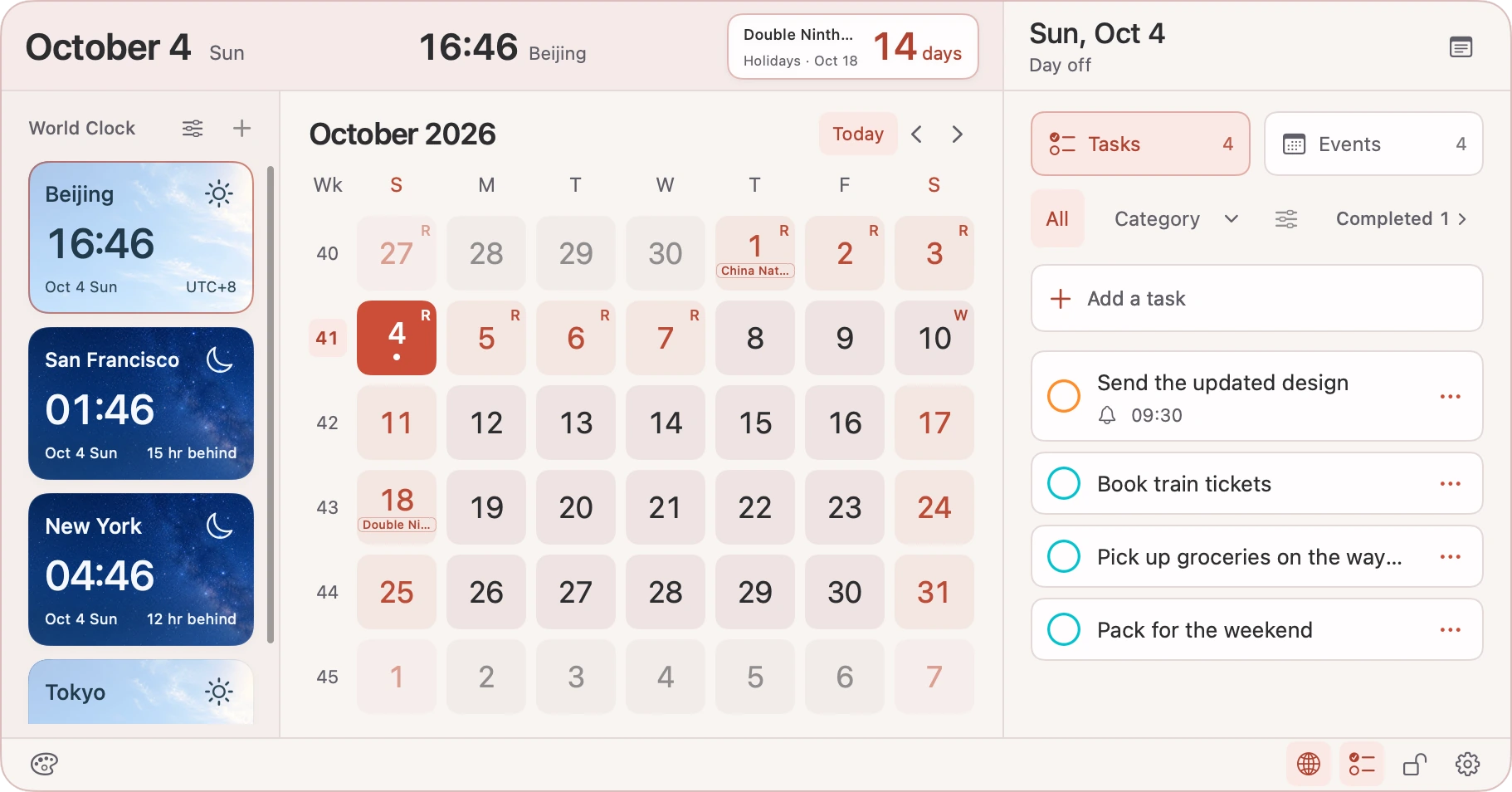
Lumax Tempo · Light appearance
Actual UI · demo data · incl. Pro

Independent

Lumax Tempo

Menu bar calendar & time

macOS · On the Mac App Store

Calendar, reminders, world clocks and desktop notes from the menu bar — a whole day, organized in a compact space.

What’s confirmed

  • A macOS menu bar app, available on the Mac App Store.
  • Calendar, reminders, world clocks and desktop notes.
  • Light and dark appearance (some features shown are Pro).

Worth talking about

  • Dense information
  • Progressive disclosure
  • Native permissions
  • Time & calendars
  • Light & dark

Actual app UI with demo calendars and reminders; screenshots include Pro features.

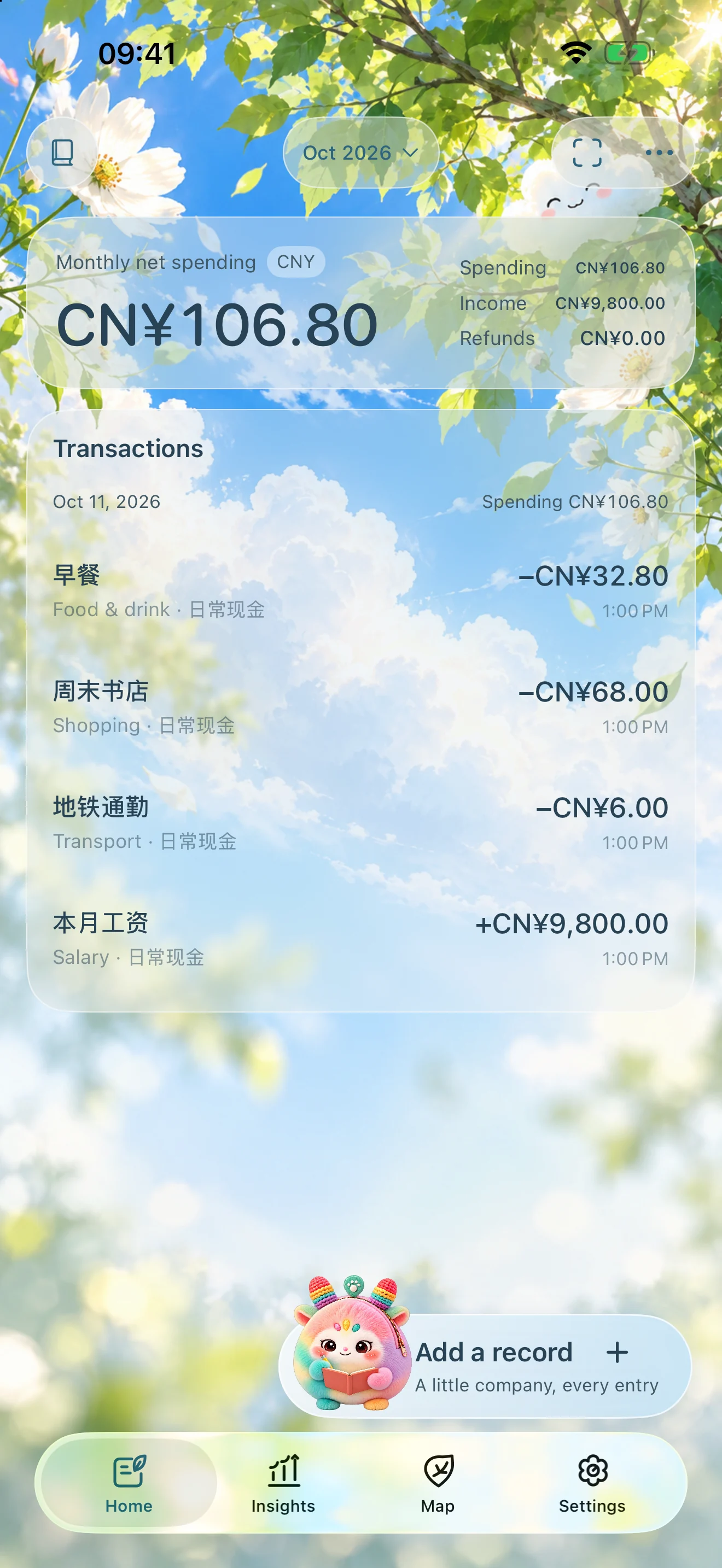
Pennilo · Home
Actual UI · sample data

Independent

Pennilo

Personal finance

iOS · On the App Store

An independent personal finance app: records stay on your device, photo recognition drafts an entry for you to confirm before it is saved, and iCloud sync is optional.

What’s confirmed

  • An iOS app, available on the App Store.
  • Local records; image recognition creates drafts that you confirm before saving.
  • Optional iCloud sync.

Worth talking about

  • Drafts vs. saved records
  • Local data, optional sync
  • Native experience
  • Recoverable actions

The home screen is a real capture with synthetic sample records; the other three are App Store artwork.

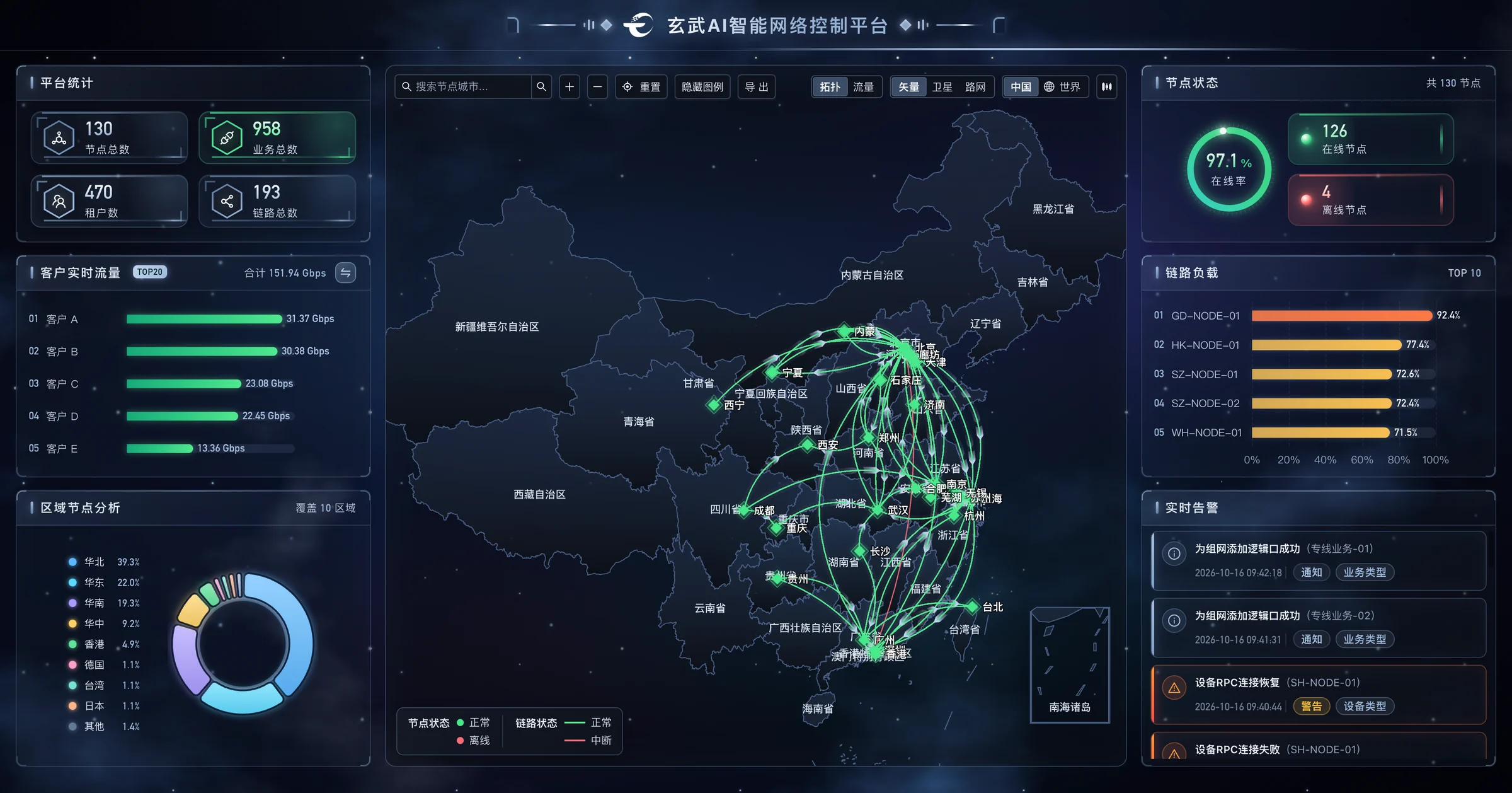
Xuanwu AI Network Control Platform · Monitoring dashboard
Actual UI · demo data

Team projects CurrentUI rebuild · AI assistant

Xuanwu AI Network Control Platform

SDN operations & service provisioning

Tianchi · 2025 — Present

Tianchi’s platform for running its SDN and provisioning services, with real-time traffic and topology monitoring. I rebuilt Xuanwu’s entire UI, added a live AI-assistant chat that reads the data on the current page, added an access-IP management system, and maintain features across the front end and back end.

What’s confirmed

  • SDN operations and service provisioning, with real-time traffic and topology monitoring.
  • Rebuilt the entire UI.
  • Added a live AI-assistant chat that uses the current page’s data as context.
  • Added an access-IP management system; maintain features across the front end and back end.

Worth talking about

  • An assistant that reads the page you’re on
  • Rebuilding a real-time monitoring UI
  • IP management
  • Owning front end and back end

These are real Xuanwu screens shown with demo data: customer, node, device, circuit and data-center names, along with statistics, traffic and alerts, have all been replaced, and the sign-in page shows the placeholder number 400-8888-888. No real customer or business information appears.

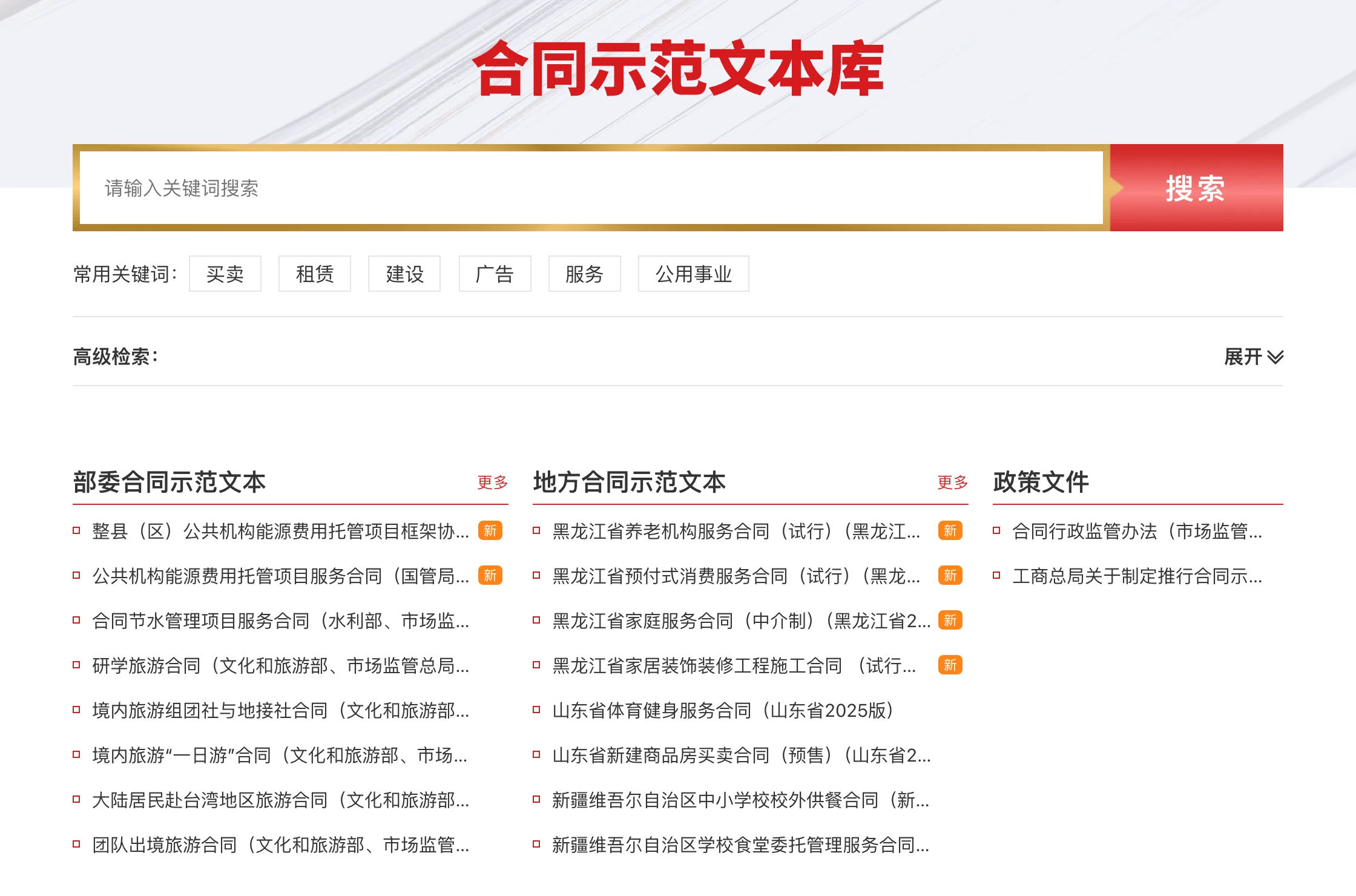
Fatianshi Contract Library · Model Contract Library
Public page · no endorsement implied

Team projects Architecture · developmentLawyers & law firms

Fatianshi Contract Library

10,000+ contract templates

Fatianshi · H2 2020 — Early 2025

More than 10,000 curated contract templates for lawyers; I set up the library’s overall architecture and built it. The library also powers the Model Contract Library website of China’s State Administration for Market Regulation (SAMR), still online for the public — I helped build that site and its data integration.

What’s confirmed

  • More than 10,000 curated contract templates for lawyers and law firms.
  • Set up the library’s overall architecture and built it.
  • Helped build the website and data integration of SAMR’s Model Contract Library; its footer credits Fatianshi’s China Contract Library.

Worth talking about

  • Organizing and searching 10,000+ templates
  • A public library for a government agency
  • Contract data integration

The capture shows the public home page of SAMR’s Model Contract Library (October 2026, agency marks omitted). The experience is self-reported and implies no institutional endorsement.

About

Taking ideas all the way to finished products.

I’m Theo Yu (于学龙). I’ve spent ten years building software — at Fatianshi and now Tianchi, owning the architecture and front end of websites and platforms. Today I work full-stack with AI agents, taking ideas all the way to finished products. Outside work I make my own apps under the UUThings (有物) name: Lumax Clip, Lumax Tempo and Pennilo are on the App Store, and TSX is open source on GitHub.

In the field
10 years
Focus
Full-stack with AI agents
Independent
4 apps under UUThings
Teams
Tianchi (now) · Fatianshi

Until 2020

Earlier Beginnings

Where the ten years of building began.

H2 2020 — Early 2025

Fatianshi 4+ years

Set up the architecture of the website and Contract Library, built more than 80% of the site’s pages and LegalOffice’s WPS and Office add-ins, and helped build SAMR’s Model Contract Library.

2025 — Present

Tianchi Current

Rebuilt the Xuanwu platform’s UI and added its AI assistant; also took Youlian Cloud from architecture to launch and built Zhijie Matrix’s front end.

Notes

Notes on why, not just what.

What I worked out while building — and how I work with AI agents.

Full notes

Working with agents

I built this site with an AI agent

I make the calls; the agent builds and checks.

This site began with a handover: I wrote down the projects, my experience, the screenshots, and what must never be published, and gave it to an AI agent. It came back with three interactive prototypes — a ring of work, a zoomable map, a desk you can pick things up from — and I chose the ring: a person at the center, the work orbiting around. Earlier rounds, a dark version and a set of static layouts, I turned down; each time I pointed at the real page, said what was wrong, and it rebuilt.

The division of labor is clear. What can go public, which phone numbers become placeholders, which responsibilities are confirmed — those calls are mine. The agent turns them into something that runs and can be checked: a static site, Chinese fonts subset to the characters on the page, content that reads in full without JavaScript, keyboard and screen-reader support, and a build that checks links, metadata and the security policy every time.

The biggest change agents bring is that one person can finish a whole product: prototype, build and verify, several rounds, quickly. But an agent won’t decide what’s worth making or what must stay unsaid. I’ve written those boundaries down as standing rules — for commits, privacy checks and releases — and they are now the most important part of how I work.

About this site

Interaction

How long should a translation interrupt you?

Where a tool begins decides how far it pulls you from your work.

TSX starts from the current selection and opens a floating panel with a shortcut; screen capture handles text that cannot be selected. Both paths answer one question: how to stop carrying text into another app.

There are limits. Whether a selection can be read depends on the source app exposing accessible text, and recognition may need correcting. A complete interaction cares for the happy path and states failure clearly — along with what you can do next.

So the result stays in the panel, where both the original and the translation can be edited. A good translation tool should step aside the moment you’re done, and let you get back to work.

Related project · TSX Open project

Information design

Dense information can still feel calm

Decide the reading order first, then how much to show.

Clip puts every kind of clipboard content into one library, with search, types and favorites as ways back in. Tempo centers on the month view, with reminders and world clocks one level away. Both fit very different information into very little space.

The approach: keep frequent actions steady and visible, and reveal rare details on demand. Categories, whitespace and consistent placement orient people better than more decoration.

When an interface quiets down, people find what they came for faster.

Related project · Lumax Clip Open project

Product thinking

Why confirm after automatic recognition?

Recognition suggests. Confirmation records.

Pennilo’s public notes keep recognized drafts separate from saved records. An image is recognized on device and lands as a draft; the user reviews it before saving. That step keeps “what the system saw” apart from “what I chose to record.”

The boundary should show in every state: unconfirmed content should never look saved, failure should never look like success, and discarding a draft should never touch existing records. Clear feedback turns automation into help rather than a new kind of doubt.

It costs one extra tap, and buys a record you’ve actually checked.

Related project · Pennilo Open project

Contact

Have something worth building? Let’s talk.

Personal email